- 100 School
- Posts
- 💯 Why everyone switched AI tools this week
💯 Why everyone switched AI tools this week
+ How you can now add Nano Banana 2 to your workflow.

Max Haining
March 01, 2026
This has been one of the stranger weeks in the AI space.
Not strange in a "wow cool new model" way. Strange in a "wait, AI companies are signing deals with the Department of War and people are choosing sides" way.
Let me catch you up.
The week things got political
This started when Anthropic refused parts of a deal with the US DoW. While Claude is already deployed across DoW for intelligence analysis and operational planning, there are two things they won't do: enable large scale surveillance or support automated weapons systems without human oversight.
Then Sam Altman announced OpenAI had reached that same deal framing it around safety principles and human oversight. However, the community notes on his tweet quickly pointed out that government officials had contradicted his framing, suggesting the agreement actually allows use for "all lawful purposes" including the things Anthropic specifically refused.
This sparked a whole "Cancel ChatGPT" wave (not the first one as MIT Tech Review covered a similar movement a few weeks earlier). Very soon after, Claude hit #1 on the App Store for the first time ever as people migrated over in real time.
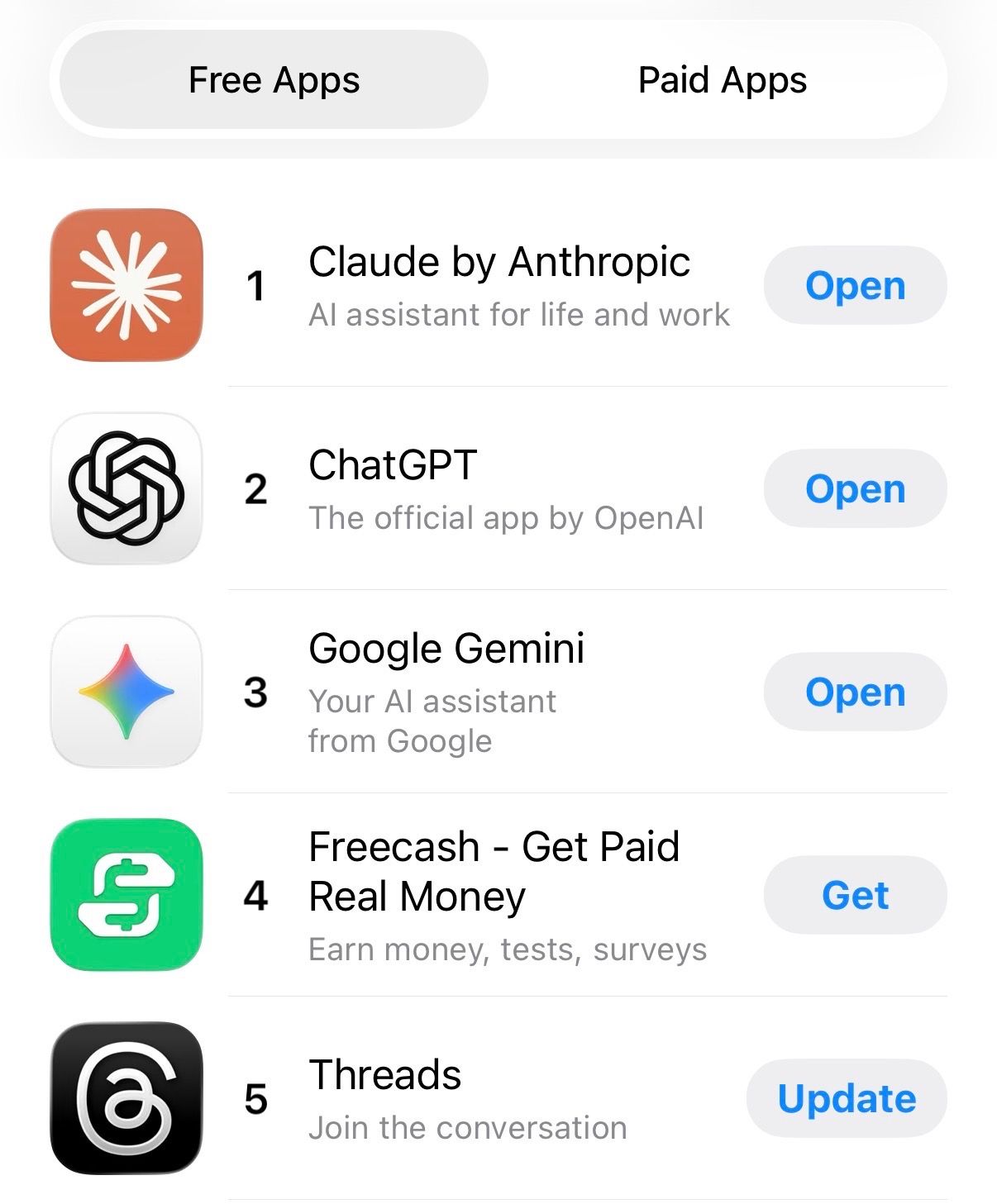
It really is fascinating watching this chart. Three of the most downloaded free apps in the US, all AI, all at the same time with the top spot going to the one that just said no to something. I'm not here to tell you OpenAI is the villain or Anthropic is a saint. But the public clearly has a read on who they trust, and this week they voted with their downloads.
The funniest part of all this was watching new Claude users discover its personality for the first time and complain that it might be too blunt compared to ChatGPT. Which honestly tracks and brings me to a question that I’d love your input on at the end of this issue.
Enough drama. On to the good stuff. 👇
Window into the future 🔮
If you're doing anything visual at work, Nano Banana 2 is worth your time.
Back in November, we played around with Nano Banana Pro when it launched, the image generator built on Gemini 3 Pro. The quality was genuinely impressive, but you paid for it in speed. It was slow.
Google's answer to that is Nano Banana 2. It's now the default image model across Gemini, Google Search, and even Google Ads, live in 141 countries.

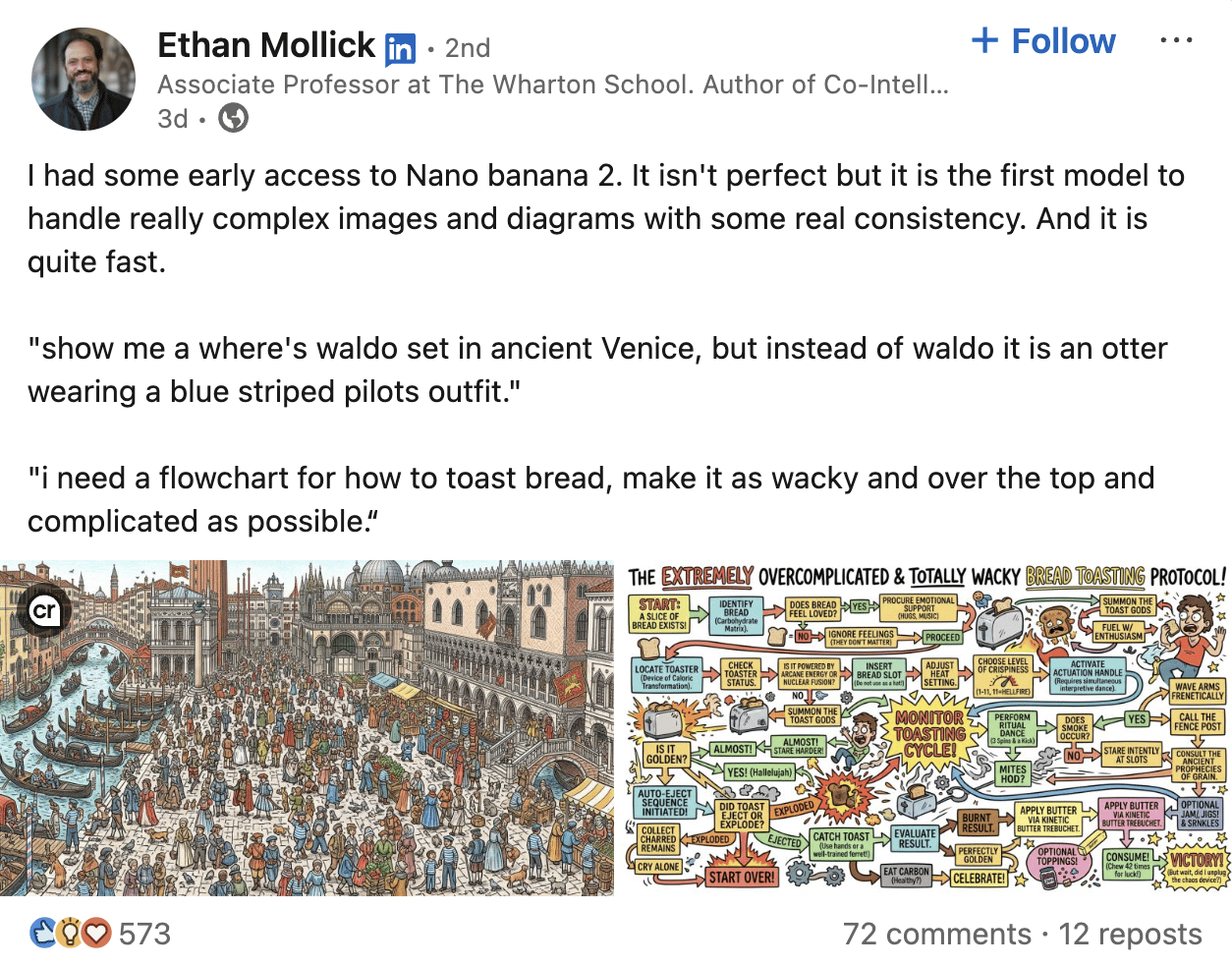
Ethan Mollick (Wharton professor, one of the most reliable AI testers out there) got early access and called it "the first model to handle really complex images and diagrams with some real consistency." He tested it with a Where's Waldo scene set in ancient Venice (with an otter in a pilot outfit, naturally). The outputs were noticeably sharper than what Nano Banana Pro was producing and way faster.
What’s new and useful about Nano Banana 2
Text inside images finally works.
Previous versions were notoriously bad at readable words with broken letters and broken fonts. Nano Banana 2 fixes this enough that you can now draft social post mockups, product labels, presentation visuals, or event invites directly in the generator and have the text be legible. Worth a proofread still, but less scrambled gibberish.
It pulls from real-world knowledge.
This is the big one. Nano Banana 2 connects to real-time Google Search data, which means it can generate visuals that are factually grounded (accurate product branding, current events, how things actually work). For anyone making educational content, decks, or thought leadership visuals, this changes what's possible.
Characters stay consistent across images.
If you’re building a storyboard, a campaign, or a visual story, this model now tracks characters and objects across up to 14 images and keeps them looking the same.
If you've used Nano Banana 2 in your own work this week, whether for a deck, a client mockup, or a social post… reply and show us what you made. I’m genuinely curious what it looks like in different professional contexts.
To try it: Google posted official prompting tips here if you want to go deeper.
How to AI 🤖
Every week, this section is your shortcut. Here are a couple of ways you could try AI this week that are worth your time:
Also, in case you missed it:
Before you go ✌️
Quick question, and this one's genuinely for me as much as for you:
When you switch between Claude, ChatGPT, and Gemini, do you notice a personality difference? And does it actually affect your work?
Hit reply. I read them all.
See you next Sunday!
P.S. Want to make your team & company AI-first? Let us help here.
